
How to Make an iPhone Ringtone from MP3
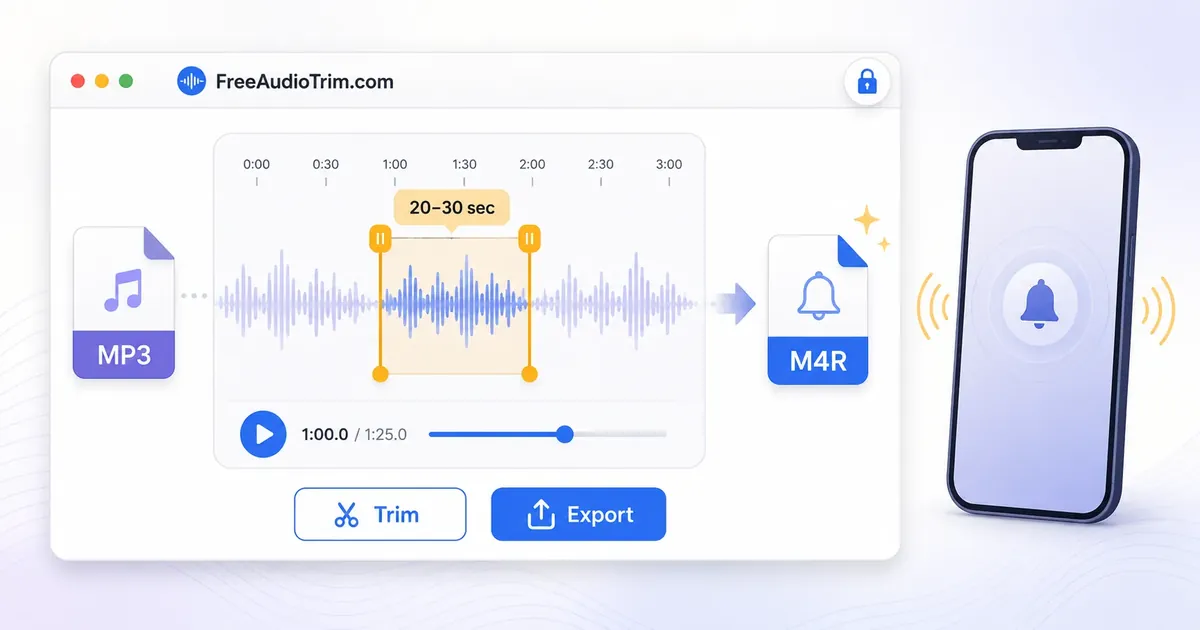
Creating an iPhone ringtone from an MP3 is a simple process when you follow the right workflow. Trim the part of the audio you want to use, convert it to the M4R format required by iPhone, transfer the file to your device, and set it as your ringtone. With the right tools, you can complete the entire process in just a few minutes.
What You Need to Create an iPhone Ringtone
Unlike many other devices, the iPhone does not use MP3 files directly for custom ringtones. Instead, it requires the ringtone to be saved in the M4R format before it can be added and selected in your ringtone settings. Converting the file into the correct format ensures your iPhone can recognize and use it properly.
Before converting, it is usually best to trim the audio and keep only the section you want to hear when someone calls. After creating the M4R file, transfer it to your iPhone and select it from the ringtone settings. This workflow works well whether you are using a song, a voice recording, or audio extracted from a video, while keeping the process straightforward from start to finish.
When This Workflow Is Useful
Creating an iPhone ringtone from an MP3 is useful when you want a custom sound instead of the default ringtone. Whether you want to use part of a song, a personal recording, or audio extracted from a video, this workflow helps you prepare it for use on your iPhone. It is also a practical choice if you want different ringtones for specific contacts or prefer a sound that is easier to recognize. Trimming the audio first lets you keep only the part you want to hear, making the ringtone shorter, clearer, and better suited for everyday use.
Convert MP3 into an iPhone Ringtone
Creating a custom ringtone is easier when you complete each step in the right order. Start by preparing the audio, convert it to the required format, transfer it to your iPhone, and then select it from your ringtone settings.
Step 1: Trim the Audio
Choose the part of the MP3 you want to use as your ringtone before converting it. Most ringtones work best when they are short and start with a clear, recognizable section of the audio. Trimming first also helps avoid converting unnecessary parts of the file.
Step 2: Convert MP3 to M4R
After trimming, convert the audio to the M4R format. This is the ringtone format recognized by the iPhone and is required before the file can be added to your device. Converting after editing helps keep the workflow simple and avoids repeating the conversion process.
Step 3: Transfer the File to Your iPhone
Once the M4R file is ready, transfer it to your iPhone using Finder, the Apple Devices app, or iTunes, depending on your computer and operating system. After the transfer is complete, the ringtone becomes available to use on your device.
Step 4: Set It as Your Ringtone
Open Settings > Sounds & Haptics > Ringtone on your iPhone and select the ringtone you added. You can use it as your default ringtone or assign it to a specific contact if you want different callers to have different ringtone sounds.
Things to Know Before Creating a Ringtone
A few simple considerations can help you avoid common issues and create a ringtone that works properly on your iPhone. Preparing the audio correctly before conversion also makes the rest of the process smoother.
Ringtone Length
Keep the ringtone short and choose a section that begins clearly. Shorter clips are easier to recognize when your phone rings and more practical for everyday use.
Audio Quality
The ringtone can only sound as good as the original recording. Starting with a clear MP3 helps preserve sound quality throughout trimming and conversion. If the source audio contains noise or distortion, those issues will remain in the final ringtone.
Copyright and Personal Use
Only create ringtones from audio that you own or have permission to use. If you are using music or other copyrighted material, make sure your use complies with the applicable rights and licensing terms.
Browser and Device Compatibility
Browser based tools work best in up to date browsers with sufficient available memory. If a file does not process correctly, try updating your browser or using another supported device before converting the audio again.
Common Ringtone Problems and Solutions
Most ringtone issues occur after the file has been converted rather than during the conversion itself. Checking a few common causes can usually help you identify and resolve the problem without repeating the entire workflow.
M4R File Is Not Showing
Make sure the audio was converted to the M4R format before transferring it to your iPhone. If another format was used, the device may not recognize it as a ringtone.
Ringtone Does Not Appear on iPhone
If the ringtone does not appear in your settings, confirm that the file was transferred successfully using Finder, the Apple Devices app, or iTunes. Disconnect and reconnect your device if necessary, then check the ringtone list again.
Transfer Was Successful but the Ringtone Is Missing
If the file transferred without errors but still does not appear, try transferring it again after reconnecting your iPhone. In some cases, restarting the device can also help refresh the ringtone library.
Unsupported File or Audio Issues
If the file cannot be converted or transferred, the source audio may be damaged or use an unsupported format. Creating a new copy of the original audio or using a standard MP3 file usually resolves compatibility issues.
M4A vs M4R: What's the Difference?
Although M4A and M4R are closely related, they serve different purposes on Apple devices. M4A is a standard audio format used for music, podcasts, and other recordings, while M4R is the format iPhone recognizes for custom ringtones. This is why an MP3 must be converted to M4R before it can be used as a ringtone. If your goal is simply to listen to audio, M4A is usually sufficient. If you want the file to appear in your iPhone ringtone settings, convert it to M4R after trimming the audio to the section you want to use. Using the correct format helps avoid compatibility issues and ensures the ringtone is ready to use.
Continue Editing Your Audio
Creating the ringtone is only one part of the process. Depending on your project, you may want to make a few final improvements before using or saving the file. Trimming unwanted sections, balancing the volume, or converting the audio into another format can help produce a cleaner result without repeating the entire workflow.
If you need additional editing, choose the tool that matches your next step. Trim the audio to remove unnecessary sections, reduce long periods of silence, normalize the volume for more consistent playback, or convert the finished ringtone into another format if required. Each step builds on the previous one, making it easier to prepare the audio for different devices and uses.
Complete Your Ringtone Workflow
After your ringtone is ready, play it once to confirm that it starts cleanly, sounds clear, and appears correctly in your iPhone ringtone settings. A quick final check helps ensure everything works as expected before you begin using it. If you plan to create more custom ringtones, keep the original audio file as your master copy. You can easily trim a different section, create additional M4R files, or make new ringtone versions later without starting the entire process again.
Frequently Asked Questions
Can I use an MP3 directly as an iPhone ringtone?
No, not reliably. iPhone can play MP3 audio, but custom ringtones usually need M4R format or a GarageBand ringtone export.
How long should an iPhone ringtone be?
Use 20 to 30 seconds. Apple GarageBand can export ringtones up to 30 seconds, and shorter clips tend to import and start more cleanly.
Should I trim before converting MP3 to M4R?
Yes. Trim first so the ringtone starts at the right moment, has no dead air, and stays within the expected length.
Can I make a ringtone from a voice note?
Yes. Save or export the voice note as an audio file, trim the strongest phrase, then convert the final short clip to M4R or export it as a ringtone through GarageBand.
Can I make a ringtone from video audio?
Yes. Use Extract Audio from Video, trim the useful sound, then convert the trimmed audio to M4R.
Can I make iPhone ringtones on Windows?
Yes. You can trim and convert the file in your browser on Windows. The final transfer step depends on your setup, such as Apple Devices, older iTunes-style syncing, iCloud Drive, or moving the file into GarageBand on your iPhone.
Can I make iPhone ringtones on Mac?
Yes. Trim and convert in the browser, then use Finder, AirDrop, iCloud Drive, or GarageBand depending on how you prefer to move the file to your iPhone.
Can I make iPhone ringtones on mobile?
Yes, but desktop is usually easier for longer source files. On iPhone, keep the clip short, save it to Files, and use GarageBand or any supported direct ringtone action available on your iOS version.
Does converting MP3 to M4R reduce quality?
It can introduce a small quality change because both MP3 and AAC-style ringtone files are lossy. For ringtones, the bigger quality issues usually come from a bad source file, harsh cut points, or repeated exports.
Is MP3 to M4R conversion private?
With supported FreeAudioTrim tools, the work runs locally in your browser, so your audio does not need to be uploaded. Keep in mind that very large files still depend on your browser and device memory.