
How to Generate Subtitles for a Video
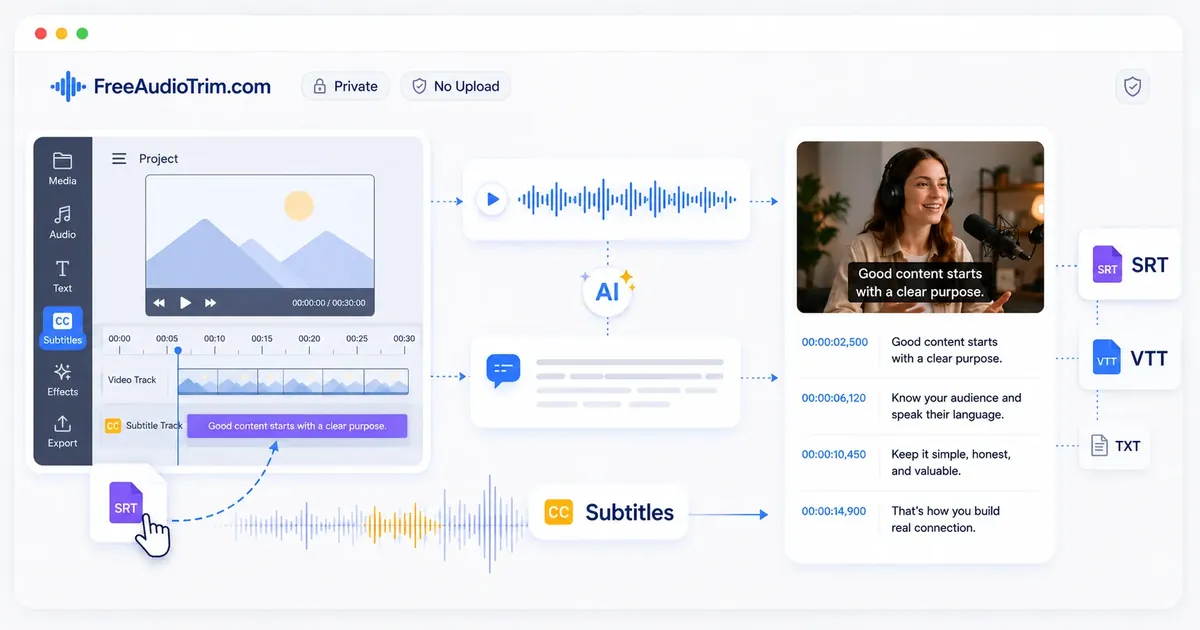
Subtitles make videos easier to understand, improve accessibility, and help viewers follow spoken content in different situations. Whether you are publishing tutorials, interviews, presentations, lectures, podcasts, or social media videos, accurate subtitles make your content easier to watch and share.
To generate subtitles for a video, create a transcript from the spoken content, review and correct the text, adjust the subtitle timing, and export the file in a compatible format such as SRT or VTT. This guide walks through the complete workflow, from preparing your video to creating accurate subtitles ready for publishing or translation.
How Video Subtitles Work
Video subtitles display spoken dialogue and other important audio as synchronized text that appears on the screen. They are created by converting speech into a transcript, dividing the text into readable subtitle lines, and assigning timing so each subtitle appears and disappears at the right moment during playback.
Good subtitles do more than match the spoken words. They should be easy to read, accurately timed, and long enough for viewers to follow naturally without distracting from the video. Before exporting, it is important to review the transcript, correct any mistakes, and check that subtitle timing follows the pace of the conversation.
Most subtitle workflows begin with generating a transcript, followed by editing the text, adjusting subtitle timing, and exporting the finished file in a format such as SRT or VTT. Those files can then be uploaded to video platforms, imported into editing software, or used as the starting point for subtitle translation.
Whether you are creating subtitles for tutorials, interviews, presentations, lectures, webinars, podcasts, or social media videos, the same workflow applies: start with accurate speech, review the generated text carefully, then refine the subtitles before publishing.
When to Generate Subtitles
Generate subtitles whenever you want spoken content to be easier to understand or more accessible. It works well for educational, professional, and online videos where viewers may be watching without sound, speaking a different language, or relying on captions for accessibility.
Privacy and Local Processing
For supported files, the FreeAudioTrim subtitle workflow processes your media locally in your browser. Your audio or video does not need to be uploaded to a server to generate a transcript, review subtitle timing, or export subtitle files.
When Subtitle Generation Works Best
Generate subtitles after your video edit is complete and the spoken content will not change. This helps avoid redoing transcript corrections and subtitle timing later.
Subtitles are especially useful for tutorials, interviews, presentations, lectures, webinars, podcasts, meetings, and social media videos where viewers benefit from reading along with the spoken content.
What Subtitle Generation Cannot Do
Subtitle generation converts speech into timed text, but it cannot fix poor recording quality, remove background noise, separate overlapping speakers, or repair unclear pronunciation. The quality of the subtitles depends on the clarity of the original recording, so reviewing the transcript and subtitle timing before publishing is always recommended.
Generate Subtitles Step by Step
A clear workflow helps you create more accurate subtitles with fewer corrections later. Start with the finished version of your video, generate the transcript, review the text carefully, then adjust the subtitle timing before exporting the final file.
Step 1: Start With the Final Audio or Video
Use the final version of your audio or video before generating subtitles. Making changes to the recording afterward can affect the transcript and subtitle timing, requiring additional edits later.
Step 2: Generate the Transcript
Begin transcription and let the tool convert the spoken content into editable text. A clear recording generally produces a more accurate first draft, making the review process faster and easier.
Step 3: Review the Transcript
Read through the generated transcript and correct any names, numbers, dates, technical terms, or punctuation before creating the final subtitles. Reviewing the text first helps prevent the same errors from appearing throughout the subtitle file.
Step 4: Choose TXT, SRT, or VTT
Select the export format that matches your workflow. TXT is suitable for editable text and documentation, while SRT and VTT are commonly used for subtitles and captions across video platforms and editing applications.
Step 5: Adjust Subtitle Timing
Review the subtitle timing to ensure each caption appears at the correct moment and remains on screen long enough to read comfortably. Small timing adjustments can improve readability without changing the spoken content.
Step 6: Preview and Export
Play the video with the subtitles enabled and check the complete result before exporting. A final preview helps confirm that the text, timing, and formatting work together smoothly across the entire video.
Choosing the Right Subtitle Format
The best subtitle format depends on where you plan to use the file after it is generated. Some formats are designed for editing and review, while others are intended for video platforms, media players, or websites. Choosing the right format from the beginning can save time later in your workflow.
TXT
Choose TXT when you only need the spoken content as editable text. It works well for notes, documentation, articles, translations, meeting summaries, or any workflow where subtitle timing is not required.
SRT
Choose SRT when you need timed subtitles for video platforms and editing software. It is one of the most widely supported subtitle formats and is commonly used for YouTube, Premiere Pro, DaVinci Resolve, and many other video applications.
VTT
Choose VTT when your subtitles will be used in HTML5 video players or other web-based applications. Like SRT, it includes timing information, but it is designed specifically for web video and supports additional formatting features in compatible players.
Editing and Translating Subtitles
After generating subtitles, take time to review the text before translating or exporting it. Correcting the original subtitles first improves readability, reduces translation errors, and helps produce more accurate subtitle files in every language.
Review Before Translation
Check the subtitle text for names, numbers, dates, technical terms, punctuation, and sentence breaks before starting translation. It is also a good time to confirm that subtitle timing matches the spoken content, since timing issues are easier to fix before creating translated versions.
Translating Subtitle Files
Translate the reviewed subtitle file instead of translating directly from the original audio or video. Starting with accurate subtitles helps preserve the intended meaning and reduces the amount of editing required afterward. After translation, review the subtitle timing and line breaks again to ensure the translated text remains clear and easy to read.
Using AI During Translation
AI can help translate subtitle text more quickly, but the output should always be reviewed before publishing. Check translated subtitles for context, terminology, names, punctuation, reading flow, and language-specific formatting. A final human review helps ensure the subtitles are accurate, natural, and suitable for the intended audience.
Using Subtitles Across Different Platforms
Subtitle files can be used across a wide range of video platforms and editing applications, but the best format depends on where the final video will be published. Most workflows use SRT for video editors and major publishing platforms, while VTT is commonly chosen for HTML5 video players and other web-based applications. Choosing the correct format before export helps reduce compatibility issues and minimizes additional editing later.
Regardless of the platform, it is good practice to preview the subtitles after importing them. Check that the timing matches the spoken content, line breaks remain comfortable to read, and subtitles display correctly throughout the video. A quick review helps ensure viewers have a consistent experience across different devices and playback environments.
Working With Arabic and Multilingual Subtitles
Creating subtitles in multiple languages begins with an accurate transcript and well-reviewed subtitle file. Correcting names, punctuation, technical terms, and timing before translation provides a more reliable source for every language version and reduces the amount of editing required afterward.
When working with Arabic or other multilingual subtitles, review the translated text carefully before publishing. Different languages vary in sentence length, reading direction, and writing style, which can affect subtitle timing and readability. After translation, preview the subtitles with the video to confirm that the text displays correctly, remains easy to read, and stays synchronized with the spoken content.
Common Subtitle Mistakes
A transcript alone does not guarantee accurate subtitles. Rushing the final review can lead to timing, formatting, or readability issues that affect the viewing experience. Avoiding a few common mistakes helps create subtitles that are accurate, readable, and synchronized with the video.
Skipping Transcript Review
Review the transcript before creating the final subtitle file. Correcting names, numbers, technical terms, punctuation, and wording first prevents the same errors from appearing throughout the subtitles.
Using Incorrect Subtitle Timing
Subtitles should appear when the corresponding words are spoken and remain on screen long enough to read comfortably. Timing that is too early, too late, or too short can make the video difficult to follow.
Creating Long Subtitle Lines
Avoid placing too much text in a single subtitle. Breaking long sentences into shorter, readable captions makes it easier for viewers to follow both the subtitles and the video at the same time.
Translating Before Reviewing the Original
Finish reviewing the original subtitles before creating translated versions. Starting with accurate subtitles helps preserve the intended meaning and reduces the amount of editing needed after translation.
Exporting the Wrong Subtitle Format
Choose the subtitle format that matches your intended use. TXT is suitable for editable text, while SRT and VTT are designed for subtitles and captions. Exporting the correct format helps avoid compatibility issues later in your workflow.
Not Previewing the Final Video
Always play the video with subtitles enabled before publishing. A final preview helps confirm that the text, timing, and formatting work together smoothly from beginning to end.
Choosing the Next Editing Step
Generating subtitles is often one part of a larger video workflow. After creating and reviewing your subtitle file, the next step depends on what you want to improve in the original content.
If the video needs shorter sections, remove unwanted parts with an audio or video cutter. For uneven speech volume, normalize the audio before the final export. If the recording contains long pauses, silence removal can help improve pacing without changing the spoken content.
For projects that need more processing, continue with the tool that matches your goal:
- Trim unnecessary sections if the recording has unwanted introductions, endings, or mistakes that should not appear in the final version.
- Remove long pauses when extended periods of silence interrupt the natural flow of the video.
- Balance the audio volume if some parts of the recording are noticeably louder or quieter than others.
- Create a transcript or additional subtitle files when you need editable text, captions, or subtitles for another recording.
- Convert the audio into another format if the finished file needs to meet the requirements of a different application or platform.
A simple workflow usually works best: finalize the content first, prepare the audio quality, generate subtitles, then export the final version for your intended platform.
Finish With Better Subtitles
Creating subtitles is not only about converting speech into text. The best results come from reviewing the transcript, refining the timing, choosing the right format, and checking how the subtitles appear with the final video. Keep subtitles accurate, readable, and synchronized with the spoken content. Avoid removing natural meaning during editing, keep translated versions consistent with the original message, and always preview the final video before publishing. A careful subtitle workflow helps make videos easier to understand, more accessible, and ready for different platforms, audiences, and languages.
Frequently Asked Questions
Can I generate subtitles without uploading my video?
Yes, for supported browser-based workflows. FreeAudioTrim is designed so supported media can be processed locally in your browser, which means your file stays on your device instead of being uploaded to a server.
What is the difference between subtitles and captions?
People often use the words interchangeably. In practice, subtitles usually focus on spoken dialogue, while captions may also include meaningful sound cues, speaker identification, and other audio context for accessibility.
What is the difference between TXT, SRT, and VTT?
TXT is plain text with no timing. SRT is the most common timed subtitle format for YouTube, social platforms, and editing software. VTT is a timed caption format commonly used by websites and HTML5 video players.
Which subtitle format should I use for YouTube?
Use SRT for most YouTube subtitle uploads. It is widely supported, easy to review, and works well as a handoff format between subtitle tools and publishing platforms.
Which subtitle format should I use for Premiere Pro or DaVinci Resolve?
Use SRT unless your delivery spec asks for something else. Import the SRT, check it against the final timeline, fix any line breaks or drift, then export a sidecar subtitle file or burn captions into the video.
How do I fix subtitles that are out of sync?
If all captions are late or early, shift the full subtitle file by the same offset. If timing drift changes throughout the video, check whether the edit changed after transcription, whether silence was removed, or whether the video frame rate changed. In that case, regenerate from the final audio or fix the affected sections manually.
Can I generate Arabic subtitles?
Yes, but Arabic subtitles need careful review. Check right-to-left display, punctuation, dialect words, names, and mixed English terms before publishing.
Can I translate subtitles after generating them?
Yes. Start with a corrected TXT transcript, translate the text, then rebuild or review the timed subtitle file. Translation can change sentence length, so expect to adjust line breaks and timing.
How accurate are automatic subtitles?
Automatic subtitle accuracy depends on audio quality, noise, accents, overlapping speech, microphone placement, language, and specialized vocabulary. Use it as a strong draft, then review anything important before publishing.
How do subtitles help accessibility?
Captions help viewers who are deaf or hard of hearing, people watching without sound, and anyone who needs support following speech. For accessibility, include important spoken words, speaker changes where needed, and meaningful sound cues that affect understanding.